Settlement readiness for Forth CRM
Stop hunting.
Start settling.
Settleable tells your negotiators which files can settle today, which are next, and why.
They open it and know exactly what to work.
Every file with money moving, checked every morning. The whole book, swept every week. Screens show demo data.
- Fresh every morning
- A floor test on every plan
- Read-only against Forth
- Microsoft sign-in. No passwords.
Every dollar in the book, put to work.
Money sitting in an account isn't settling anything. Settleable finds it and points it at a debt.
Plugs into Forth.
Nothing to migrate. Your team keeps working where it already works.
Runs in days.
Shadow mode within days of the mapping call. Two weeks side by side, then go-live.
Negotiators make the call.
Settleable does the math. Your people make the deal.
How it works
Three steps. Every morning.
-
01 · Sync
Pull what moved.
Every file with money moving, every morning. The whole book, every week.
Drafts, payments, fresh activity. Read-only, always.
What gets pulled from Forth One week - Mon only the files with money moving
- Tue only the files with money moving
- Wed only the files with money moving
- Thu only the files with money moving
- Fri only the files with money moving
- Sat the whole book
- Sun the whole book again, only if Saturday did not finish
- Saturday: the whole book
- Every client, every debt. Sunday repeats it only if Saturday's pull did not finish.
- Other days: money moving
-
- A draft due today
- A draft due yesterday: did it clear?
- A settlement payment due today
- A file somebody worked since the last pull
-
02 · Floor test
Test every plan.
We project each account forward, drop in the settlement, and check it never dips below your buffer.
One payment if the cash is there. Up to twelve if it isn't.
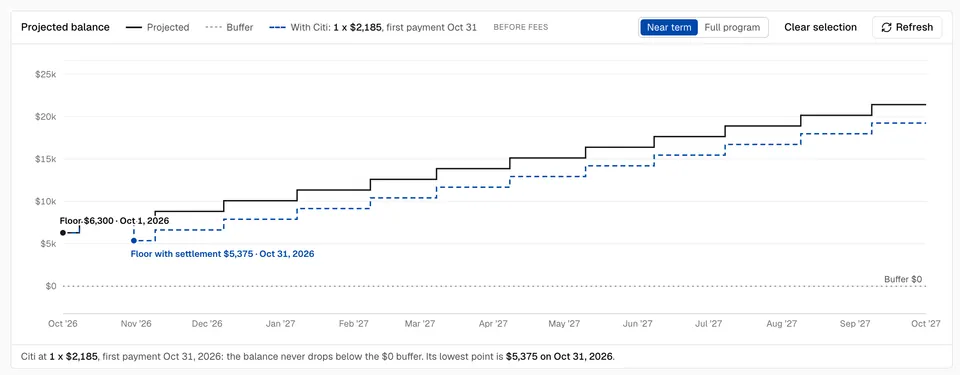
Dashed line: the account with the settlement in. Its lowest point clears the buffer, so it can settle today. Before fees. -
03 · Queue
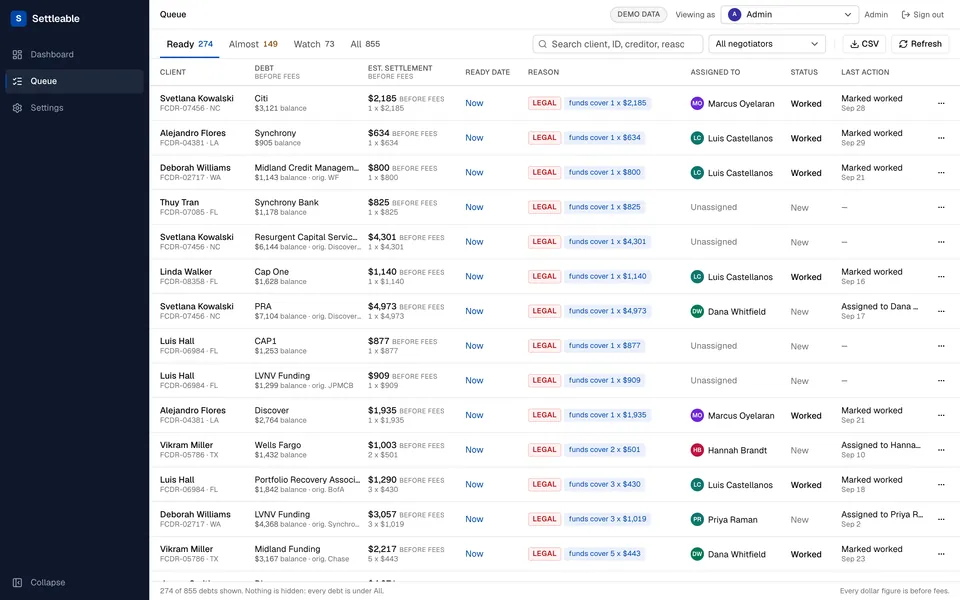
Work the list.
- Ready. The cash is there today.
- Almost. The date it's fundable, and the dollars it's short.
- Watch. Not in reach yet.
Every row tells you why.
Debt settlement negotiator tools
Built to turn idle money into settled debt.
-
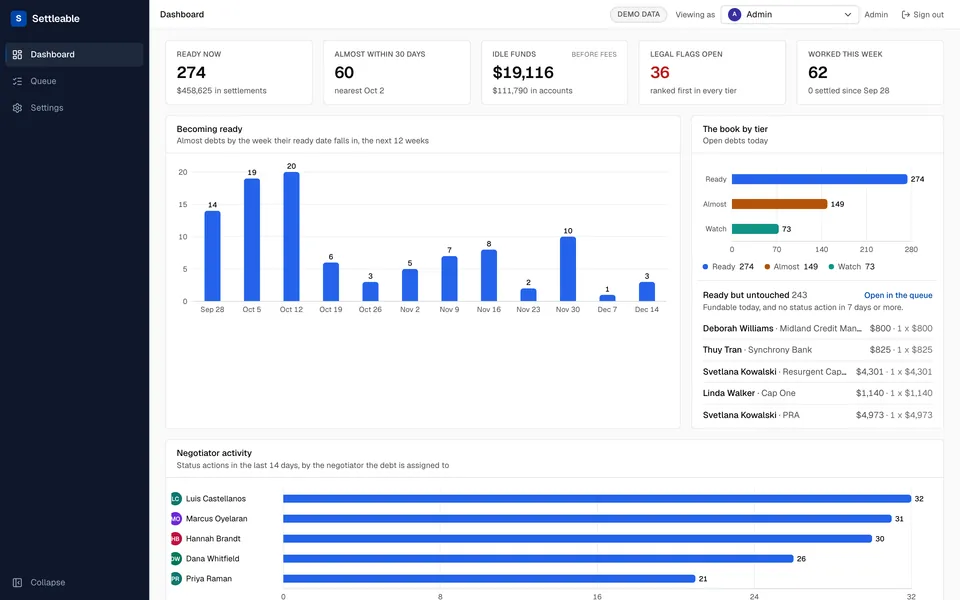
Becoming ready
See the next 12 weeks of debts turning fundable.
-
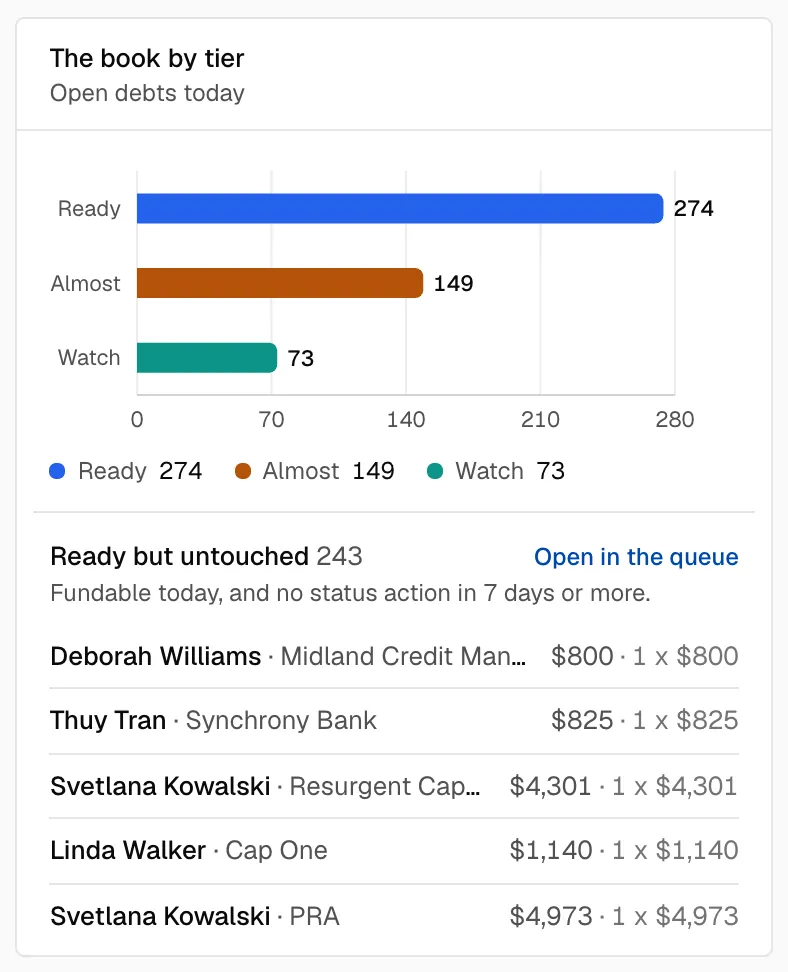
Ready but untouched
Catch the fundable files nobody worked this week.
-
Almost, with dates and dollars
Know the day it's ready and the dollars it's short.
-
Reason chips
Every row tells you why it's in its tier.
-
Activity log
Who did what to every debt, and when.
-
CSV export
Take the queue anywhere, exactly as you see it.
-
Admin and agent views
Managers see the book. Agents see their files.
-
Before fees, always
Every figure leaves fees out, and says so.
One screen. Two jobs.
For managers
- See the book at a glance. Ready, almost, idle cash, legal flags.
- Know who's working what. Activity by negotiator, and the ready files nobody touched.
- Track what settled. This month's settlements against what was owed.
For negotiators
- Open it. Sign in with Microsoft. Land on your files.
- See what's ready. Ready first, legal first, a reason on every row.
- Work it. Pick the debt. See if the account holds.
- Mark it. Worked, settled, refused, snoozed. The queue keeps up.
Security
Your book stays yours.
- Your own instance.
- Each client runs on its own single-tenant instance, hosted in the US, encrypted in transit and at rest.
- Read-only against Forth.
- Version one pulls from your CRM. It never writes into it.
- Your key, your switch.
- You issue the Forth API key. Revoke it in Forth whenever you want.
- Microsoft sign-in. No passwords.
- Nothing to create, reset or leak. Disable someone in Microsoft 365 and they're out.
Onboarding
From first call to go-live.
-
Step 1 · 45 minutes
Map it.
We walk your Forth setup with your ops lead. You get every assumption in writing.
-
Step 2 · Two weeks
Shadow it.
Settleable runs read-only next to your team until the numbers match.
-
Step 3
Ship it.
Your team signs in with Microsoft and opens the queue. That's go-live.
FAQ
Questions? Answered.
What does Settleable actually do?
It tells your negotiators which files can settle today, which are next, and why. Then it gets out of the way.
Does it only work with Forth?
For now, yes. Version one is built around Forth CRM's data: contacts, debts, drafts, offers and payments.
Does it write to my CRM?
No. Version one is read-only. We pull from Forth. We never write into it.
How are fees handled?
They're left out. Every figure is before fees, and every screen says so.
What if my payment processor is different?
Set clearing days per payment method. The projection moves each payment to the day the money really leaves.
How long to go live?
About two weeks after the mapping call. Shadow mode first, until the numbers match. Then go-live.
Who sees what?
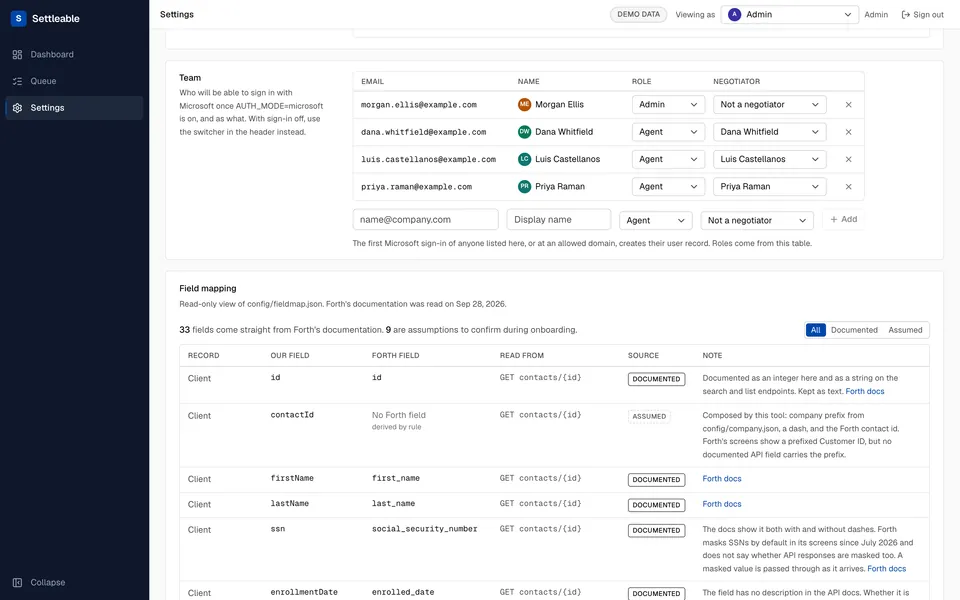
Admins see everything. Agents land on their own files. Flip one setting and agents see only theirs.
How is pricing structured?
Setup plus monthly, with founding pricing for early teams. No public price list. Book a demo and we'll walk you through it.
Ready to see your book in Settleable?
We'll show you the queue, the floor test and the dashboard. Then we'll map your first two weeks.
Rather email?
amer@vertexresolution.com
You're in.
We'll reply to to lock in a time.
Almost there. Hit send.
Your request is written up in an email to us. Open it and send.
Open the emailOr write to amer@vertexresolution.com with the same details.